


This kit is available with and without the hanging bracket and fasteners as options below. It's accurate to +/- 1% and runs on just (2) AAA batteries (not included).
The scale indicator quickly reads and displays weights in pounds or kilograms and is designed for use with both the 14" Portable Scale and the 20" Portable Scale.
Scroll down for pictures and details below
The Digital Livestock Scale Indicator Kit provides a digital weight display for compatible portable animal scales used to weigh hogs, sheep, goats and other appropriately sized livestock. The C100 indicator displays weights in pounds or kilograms and offers three operating modes, including an animal averaging function designed to help obtain a usable weight reading when livestock move on the scale.
This battery-powered livestock scale display is available with or without a hanging bracket and fasteners. It is listed for use with Barn World's 14-inch and 20-inch portable animal scales, making it a useful option for customers replacing an indicator or completing a compatible weighing setup. Explore the full selection of livestock scales for complete weighing equipment.
Digital Livestock Scale Indicator Specifications
| C100 Digital Animal Scale Display | |
|---|---|
| Indicator model | C100 |
| Display units | Pounds or kilograms |
| Listed accuracy | ±1% |
| Power supply | 2 AAA batteries |
| Batteries included | No |
| Weighing modes | Animal Average, Direct Readout, Scaled Readout |
| Animal averaging period | 5 seconds |
| Mounting options | With or without hanging bracket and fasteners |
| Listed scale compatibility | 14-inch and 20-inch portable animal scales |
Compatibility note: The indicator is identified for specific Barn World portable animal scales. Confirm the scale model and electrical connections before purchasing it as a replacement for another weighing system.
Digital Scale Indicator with Optional Hanging Bracket
The indicator kit is available in configurations with and without the hanging bracket and fasteners.
A mounting bracket can help position the display where the operator can read the weight while managing livestock.
If an existing compatible bracket is already installed, the indicator-only configuration may be appropriate. Confirm the supplied components for the selected option before ordering.

Three Digital Weighing Modes
The C100 indicator provides three operating functions selected using the blue unit button.
According to the original product instructions, pressing and holding the blue button for approximately one second accesses the available modes.
Animal Average Function (AAF)
The Animal Average Function is the default operating mode.
When an animal steps onto the scale, the indicator detects the weight and collects readings over approximately five seconds.
It filters and averages the readings before displaying the resulting weight.
This function is especially useful when weighing live animals that may shift their position rather than standing completely still.
Movement can affect scale readings, so the averaging function provides a practical way to obtain a more stable displayed result.
Direct Readout (dIr)
Direct Readout displays the measured weight without the five-second animal averaging process described for AAF mode.
This may be useful when the object being weighed is stationary or when the operator needs to observe the current scale reading.
Scaled Readout (SCr)
Scaled Readout provides an immediate displayed weight reading as described in the original product information.
Use the manufacturer's operating instructions to determine which readout mode is appropriate for a particular weighing procedure.
How to Weigh Livestock Using Animal Average Mode
The Animal Average Function is intended for livestock weighing applications where animal movement may cause readings to fluctuate.
- Prepare the scale. Place the compatible scale on a stable surface and follow the scale manufacturer's setup instructions.
- Turn on the indicator. Confirm that the display is functioning and that the correct weight unit is selected.
- Use Animal Average mode. The original instructions identify AAF as the default setting.
- Move the animal onto the scale. Allow the animal to stand safely within the weighing platform.
- Wait for the reading. The indicator collects and averages weight data over approximately five seconds.
- Record the displayed weight. Use the reading for the appropriate livestock management record.
- Reset for the next animal. After unloading, press the red Power/Tare button as described in the product instructions.
To weigh the same animal again while it remains on the scale, the original instructions direct the operator to press the red Power/Tare button while the previous average is displayed.
Compatible Portable Livestock Scales
The original Shopify product description identifies two compatible portable animal scales.
14-Inch Portable Animal Scale
The 14-inch portable animal scale is one of the listed compatible weighing platforms.
This narrower scale format may be useful for appropriately sized livestock when the platform dimensions and capacity meet the intended application.
20-Inch Portable Animal Scale
The 20-inch portable animal scale is also identified as compatible.
Its wider platform may provide additional standing space for suitable animals.
Before purchasing an indicator separately, verify that the scale's connections and configuration match the C100 display.
Why Use a Digital Livestock Scale Indicator?
Weight Monitoring
Routine weighing can help livestock owners monitor changes in animal weight over time.
Accurate records may support feeding decisions, growth monitoring, and general herd management.
Livestock Sales and Management
Weight information can be useful when evaluating animals for marketing or management purposes.
Where weights are used in commercial transactions, confirm that the weighing system meets any applicable legal-for-trade requirements. The original listing does not establish that this indicator is certified for legal-for-trade use.
Portable Weighing Systems
A compact battery-powered display can be useful with compatible portable scales when a permanent weighing installation is not required.
The indicator uses two AAA batteries, avoiding the need for a separate electrical outlet during ordinary operation.
Replacement Indicator
Customers who already own a compatible portable animal scale may need to replace the digital display without purchasing another complete weighing platform.
Confirm the existing indicator model and connector arrangement before ordering.
Using Pounds or Kilograms
The C100 display supports weight readings in pounds and kilograms.
Choose the unit that matches your recordkeeping or livestock management needs.
For consistent records, use the same unit when comparing an animal's weight across multiple weighing sessions.
Refer to the instruction manual for the exact procedure for changing display units.
Battery Installation and Care
The indicator operates on two AAA batteries, which are not included.
Install the batteries according to the manufacturer's polarity markings and instructions.
If the display becomes difficult to read or behaves unexpectedly, inspect the battery condition before assuming the indicator has failed.
Protect the unit from moisture, impact, and conditions outside its specified operating environment.
Remove batteries before extended storage if recommended by the manufacturer.
Maintaining Accurate Weight Readings
The original product listing states an accuracy of approximately ±1%.
Actual weighing performance depends on the complete scale system, including its platform, sensors, connections, setup, and operating conditions.
For consistent results:
- Place the scale on a stable surface.
- Inspect the platform and indicator connections.
- Keep the scale free from obstructions.
- Use the appropriate operating mode.
- Follow the manufacturer's zeroing and calibration instructions.
- Record weights using a consistent procedure.
Do not assume that the indicator alone determines the accuracy of an entire weighing system.
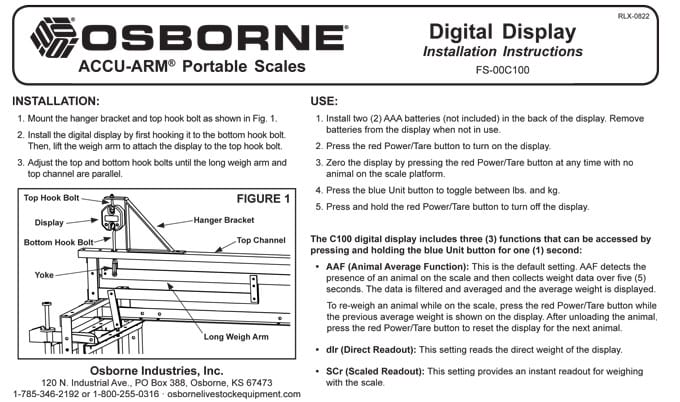
Digital Livestock Scale Indicator Instructions
The original product listing includes an instruction manual for the digital display.
View the Digital Scale Indicator Instructions and Manual (PDF)
The original instruction image is reproduced below.
Choosing the Correct Indicator Configuration
Before ordering, determine whether you need the digital indicator by itself or the version supplied with a hanging bracket and fasteners.
Customers replacing an existing display should confirm that the mounting hardware and electrical connections are compatible with the new unit.
Customers assembling a weighing setup should verify the requirements of the complete portable scale.
For other weighing equipment, review Barn World's livestock scales and weighing accessories.
Frequently Asked Questions
What is the Digital Livestock Scale Indicator Kit?
It is a battery-powered digital weight display designed for use with compatible portable livestock scales.
Which portable scales are compatible?
The original product listing identifies Barn World's 14-inch and 20-inch portable animal scales.
Does it display pounds and kilograms?
Yes. Both weight units are supported.
What batteries does the indicator require?
Two AAA batteries are required and are not included.
What is the Animal Average Function?
AAF collects weight readings over approximately five seconds and averages them to help provide a usable reading when an animal moves on the scale.
What does Direct Readout do?
Direct Readout displays the measured weight without the described animal averaging process.
What does Scaled Readout do?
The original instructions describe it as providing an immediate scale weight reading.
How do I change weighing modes?
The original product description directs users to press and hold the blue unit button for approximately one second to access the available functions.
How do I reset the display for the next animal?
After unloading the animal, press the red Power/Tare button according to the original instructions.
Is the mounting bracket included?
The product is offered with and without the hanging bracket and fasteners. Select the appropriate configuration before ordering.
How accurate is the indicator?
The original product listing specifies ±1% accuracy. Performance also depends on the complete weighing system and correct setup.
Can I connect this indicator to any livestock scale?
Not necessarily. Confirm model compatibility and electrical connections before purchasing it for a scale not identified in the original listing.
Is the indicator approved for commercial livestock sales by weight?
The original product information does not establish legal-for-trade certification. Verify applicable requirements before using it for regulated commercial transactions.
Order the Digital Livestock Scale Indicator Kit
The Digital Livestock Scale Indicator Kit provides three weighing modes, pounds or kilograms display, and battery-powered operation for compatible portable livestock scales.
Choose the configuration with or without a hanging bracket and confirm compatibility with your existing weighing platform.
For questions about the correct indicator or complete scale equipment, contact Barn World with your scale model and intended livestock application.
Explore more animal scales and weighing equipment for related products.